
Choose your on-premises installation scenario
01Two modes, four scenarios #sec_d942e224
The on-premises edition installs in two ways, of your organization's choice:
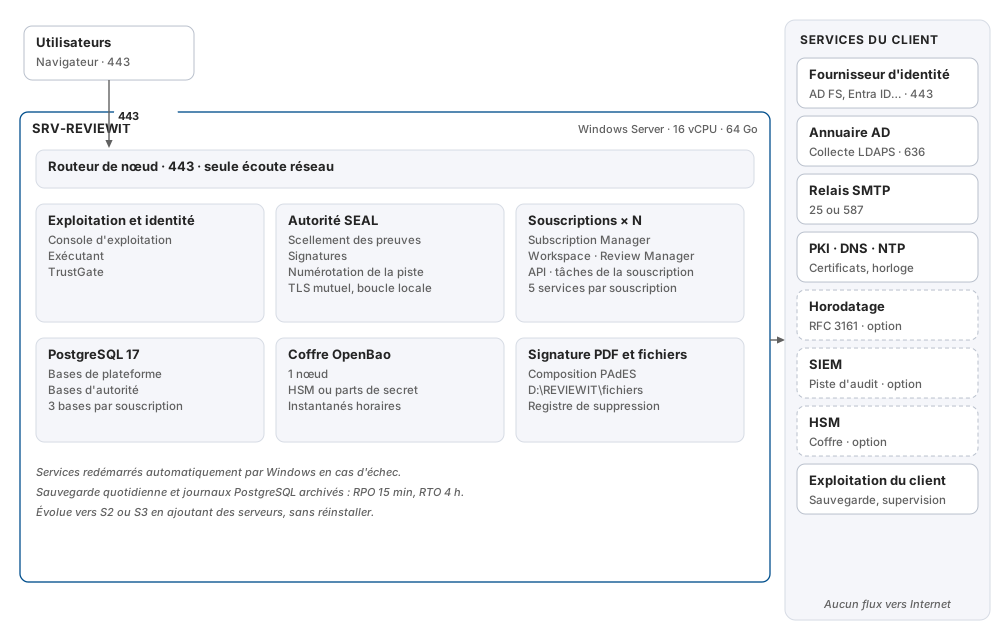
- single server: one server handles everything;
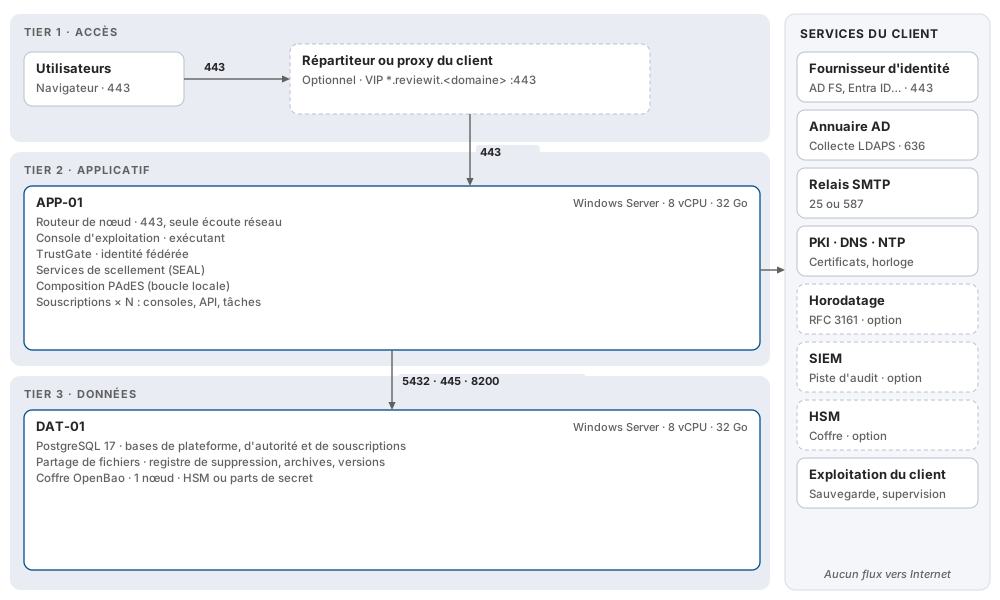
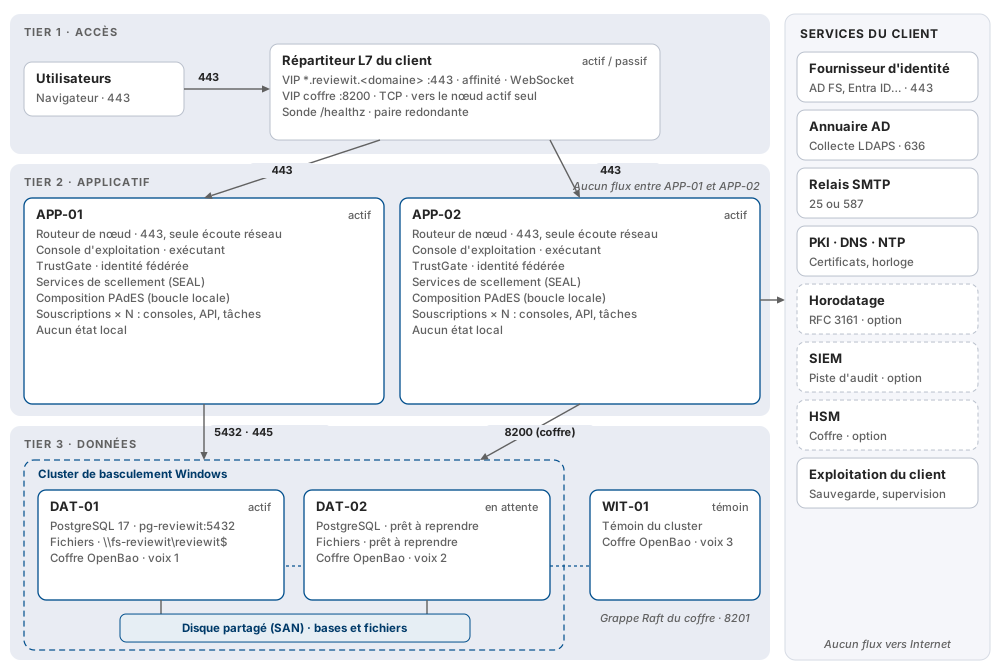
- 3-tier architecture: a front-end tier (your load balancer), a separate application tier and a data tier, with the level of availability you choose.
| Scenario | REVIEWIT Servers | Availability | Data loss / recovery (indicative) | For whom |
|---|---|---|---|---|
| S1 — Single server | 1 | Automatic service restart | 15 min / 4 h | Pilot, medium-sized entity, secondary site |
| S2 — Simple 3-tier | 1 application + 1 data | Separate tiers, no redundancy | 15 min / 4 h | Organization that requires tier separation |
| S3 — High-availability 3-tier | 2 application + 2 data + 1 witness | Loss of one server does not interrupt service | 0 / 2 min | Production of a large account |
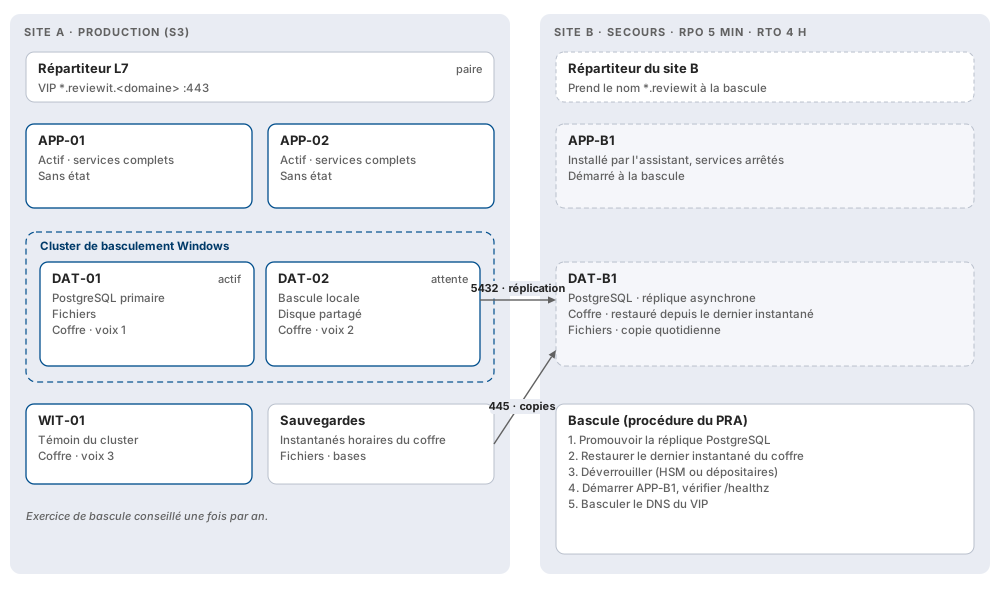
| S4 — HA 3-tier + PRA | S3 + 1 application and 1 data on a second site | Loss of one site is recoverable | 5 min / 4 h | Regulated sectors |
Data loss and recovery values are orders of magnitude, calibrated during the pilot program.
02Moving from one scenario to another #sec_780933a9
The topology is an installation parameter, not a fixed choice at first deployment. You move from S1 to S2, from S2 to S3, then from S3 to S4 by adding servers, without reinstalling: each new server joins the existing installation with an encrypted adhesion package produced by the first server.
A pilot can therefore start as a single server and scale to high availability when moving to production.
03Option: a dedicated authority zone #sec_bed05756
Components that SEAL proofs can leave the application servers for two dedicated authority servers, in a restricted network zone. This option adds to scenarios S2, S3 or S4, for organizations that require SEAL to live separately from user services.
04Indicative sizing #sec_d063d1a9
| Role | Processors | Memory | Disks |
|---|---|---|---|
| Single server (S1) | 16 vCPU | 64 GB | 128 GB system, 500 GB SSD (databases, vault, files), 100 GB (logs) |
| Application | 8 vCPU | 32 GB | 128 GB system, 100 GB |
| Data | 8 vCPU | 32 GB | 128 GB system, 500 GB shared SSD (databases), 200 GB shared (files) |
| Witness (S3, S4) | 2 vCPU | 8 GB | 64 GB system, 20 GB |
| Authority server (option) | 4 vCPU | 8 GB | 64 GB system |
A single server supports up to three subscriptions, an application server up to five; beyond that, count approximately 1 vCPU and 4 GB of memory per additional subscription. Database volume grows with the number of governed identities and decisions. These values are indicative: they are measured and adjusted during the pilot program.
05Which scenario to choose #sec_84e9f941
- You are evaluating REVIEWIT, or a mid-sized entity uses it alone: S1. This is the simplest to set up and maintain.
- Your policy requires separate third parties, with no continuity requirement: S2.
- REVIEWIT supports production campaigns for the entire group: S3. Each application server carries the entire load; Windows patches are applied one server at a time, without interruption.
- Your regulator requires a recovery plan on a second site: S4.
Next: prepare your information system, then the detailed architecture.